
At KTF Software, we don’t just supply BricsCAD licences — we make them manageable in real-world environments.
We’ve developed our own toolkit to simplify auditing, activation, and deactivation, giving IT teams control without needing to open BricsCAD or wrestle with licensing tools.
BricsCAD licensing is straightforward. Until it isn’t.
In a real environment, it often becomes unclear.
Licenses move between machines.
Users change.
Devices get replaced.
And at some point, you’re left asking:
What’s actually active, and where?
In real-world environments, licensing issues usually come from everyday changes, such as:
Nothing unusual.
But without clear visibility, these situations become difficult to resolve quickly.
The issue isn’t the licensing system.
It’s visibility.
You can’t fix what you can’t see.
If you can’t see what’s active, where it’s being used, or whether something has been deactivated properly, you’re left working it out manually.
That’s where time gets lost.
We see this often enough that guessing isn’t acceptable anymore. So we built a way to get clear answers quickly.
This isn’t theory — it’s built from the licensing issues we deal with every day.
It’s designed to make BricsCAD licensing easier to understand in real-world environments — not just for us, but for the teams managing it day-to-day.
Here’s what that looks like in practice:
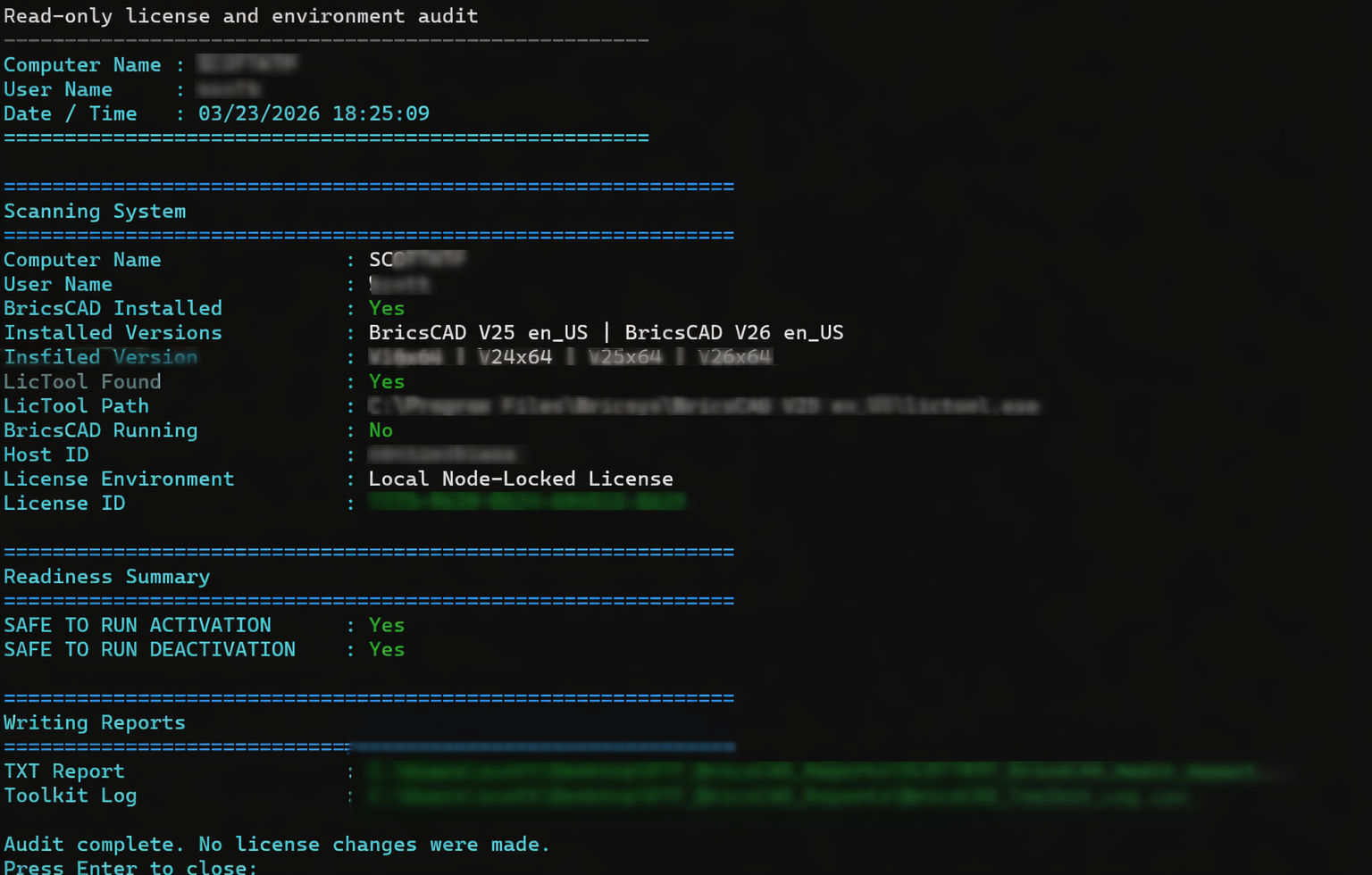
In practice, it allows you to:
Nothing complicated.
Just a clear view of what’s happening.
Not sure what your current BricsCAD licensing setup looks like? We can help you get a clear picture of what’s happening.
Instead of relying on guesswork or escalating issues, you can see what’s going on and deal with it directly.
That means:
Once you can clearly see what’s happening, everything becomes easier.
You’re not guessing where a license is. You’re not working backwards from an error. You’re not relying on assumptions.
You can see the current state and act on it.
For CAD teams, that means fewer interruptions.
For IT teams, it means being able to manage licensing without needing deep knowledge of the software.
For the business, it means less time lost dealing with avoidable issues.
It’s not about adding another tool. It’s about making something that should be straightforward, actually work that way in practice.
This isn’t a public download.
It’s something that we’ve developed as part of supporting KTF Software customers — particularly for:
If you need a clear picture of your BricsCAD licensing setup — we can help.
SHARE
We’ll help you understand what’s active, where, and what to do next.
We’ll review your requirements and confirm if a Proof of Concept is the right approach before getting started.
