BricsCAD® in the UK: A smarter alternative to AutoCAD®

Licenses, migration, training and support from KTF Software

BricsCAD is DWG-based CAD software from Octave, covering 2D drafting, 3D modelling, BIM and mechanical design. It runs on Windows, macOS and Linux, and you can own it outright with a perpetual license or pay by subscription.

KTF Software has been supporting BricsCAD users in the UK since 2008. We help you choose the right edition, move your team across from AutoCAD and keep everyone productive afterwards.

bricscad-hero
BricsCAD-logo

Why switch to BricsCAD
from AutoCAD?

Own your software if you want to

BricsCAD is still available on a perpetual license, so you can buy it once and decide for yourself when to upgrade. If you’d rather spread the cost, a subscription works too.

Your drawings and habits come with you

BricsCAD opens and saves DWG natively, and most AutoCAD commands work under the same names. Experienced AutoCAD users are usually comfortable within a day or two.

One platform as your work grows

Start with 2D in BricsCAD Lite and move up to Pro, BIM, Mechanical or Ultimate when you need to. Your files, settings and training carry over at every step.

Upgrades on your terms

With a perpetual license and maintenance, you choose when to move to a new version. We’ll check your plug-ins and routines first, so an upgrade never catches you out.

See BricsCAD in Action

From survey data to detailed design

Bring in survey data, draft in 2D, model in 3D and produce BIM or manufacturing drawings, all in the same application and the same DWG files.

Share drawings with anyone using AutoCAD

Because DWG is BricsCAD’s own format, clients, consultants and subcontractors on AutoCAD open your drawings as normal. Nobody needs to know you’ve switched.

Flexibility_to_use_2D_and_3D_workflows
ultimate_benefits_2

Extend it for the work you do

BricsCAD Pro and above run specialist plug-ins, including our own Qarb for tree surveys, Qscape for landscape design and KeyTERRA-FIRMA for terrain and civil work.

Try BricsCAD on your own drawings

Download the full version free for 30 days. If you’d like a second opinion on which edition suits your team, our UK team is happy to talk it through.

KTF Software
The Only Octave BricsCAD Premium Partner in the UK

KTF Software Logo - Blue Complex
Octave BricsCAD Premium Partner Logo

We’ve been selling and supporting BricsCAD since 2008, and we develop our own plug-ins for it in-house. Our customers get UK support by phone and remote session, training built around their own workflows, and KTF Pointcloud and KTF MiniTools free with an active subscription or maintenance plan.

Choose the Right BricsCAD License

Every edition uses the same DWG platform, so you can start with what you need today and upgrade later without changing how you work.

bricscad-ultimate-rgb-na-en-us-6683dca12c68e-scaled.webp

Everything in one license: 2D drafting, 3D modelling, civil and survey tools, BIM and mechanical design. Best for teams who work across several disciplines.

bricscad-lite-rgb-na-en-us-666b08f13e721.webp

2D drafting and detailing, with LISP support for your existing routines. A natural fit for teams moving from AutoCAD LT.

bricscad-pro-rgb-na-en-us-666b08f12d8cf.webp

2D drafting, 3D modelling and civil and survey tools in one platform. Pro is also the edition that runs plug-ins such as Qarb, Qscape and KeyTERRA-FIRMA.

bricscad-bim-rgb-na-en-us-666b08f0c15d4.webp

Building design and IFC-based workflows, for teams who need to exchange models with other disciplines on shared projects.

bricscad-mechanical-rgb-na-en-us-666b08f0d7c5c.webp

2D and 3D mechanical design, including assemblies and sheet metal, for engineers designing manufactured parts.

Lower cost to own

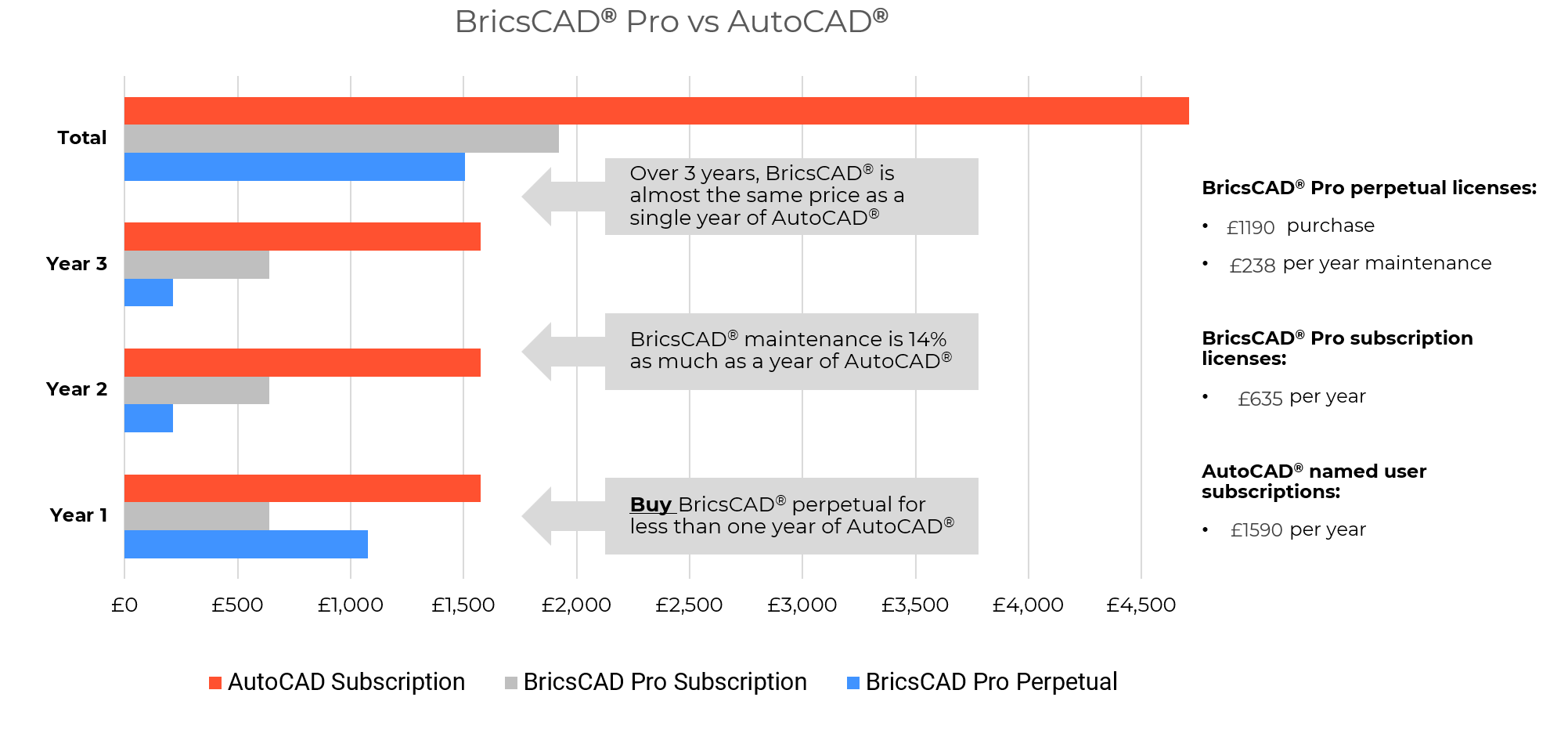
A perpetual license with optional maintenance usually costs far less over a few years than renting other CAD software. We’re happy to price up your own scenario.

Familiar from day one

The interface, command line and most command names will be familiar to any AutoCAD user. Our AutoCAD to BricsCAD course covers the differences in a few hours.

learnable

DWG from the start

DWG is BricsCAD’s native format, not an import. Your existing drawings, blocks and templates keep working, and you can exchange files with AutoCAD users every day.

bricscad-compatible

If you can use AutoCAD, you can use BricsCAD.

Supported File Formats

BricsCAD reads and writes the file formats you already use.

Core formats

DWG
AutoCAD
DXF
DWT
ACIS SAT
PDF
Micro_Station_icon
Micro Station
Colada
JPEG
TIFF
Draftsight_icon
Draftsight
Wavefront
Wavefront

BIM formats

RhIno
Rhino
Sketchup
Sketchup
Revit
Revit
IFC
IFC

3D & Mechanical formats (via Communicator add-on)

*requires an extra-cost module Communicator for BricsCAD
Parasolid
Parasolid
CATIA
CATIA
Creo
3D PDF
Solidworks
Solidworks
Inventor
Inventor
STEP
IGES
Siemens_NX
Siemens_NX
ACIS
STL
Solid_edge_Icon
Solid Edge

Ready to see BricsCAD working for your team?

Start a free 30-day trial, or speak to us about a Proof of Concept on your own drawings and workflows.

FAQ

Common questions about buying, licensing and switching to BricsCAD

Yes. BricsCAD uses DWG as its native format, so you can open, edit and save AutoCAD drawings directly, and anyone using AutoCAD can open yours.

You can do either. A perpetual license means you own the software, with optional maintenance for upgrades and support. A subscription gives you the latest version for a year at a time. Both are available as single-user or network licenses.

Lite is for 2D drafting. Pro adds 3D modelling and civil and survey tools, and runs plug-ins such as Qarb, Qscape and KeyTERRA-FIRMA. BIM is for building design and IFC workflows, Mechanical is for manufactured parts, and Ultimate includes everything. If you’re unsure, tell us what your team draws and we’ll recommend one.

BricsCAD supports LISP and most AutoCAD customisations. Before you commit, we can test your own routines, templates and workflows in a Proof of Concept, so you know exactly what to expect.

Yes. BricsCAD runs on Windows, macOS and Linux.

Yes. The full version is free for 30 days. We can help you set it up so you can test it on your own drawings.

Yes. We plan and manage the move for you, including setup, standards, training and support afterwards. You can read how it works on our BricsCAD Migration page.

Last reviewed: October 2026

Powered by Full Pelt Ltd
Get BricsCAD® Software Free Trial
Start Your Proof of Concept

We’ll review your requirements and confirm if a Proof of Concept is the right approach before getting started.

Make Sense of Your BricsCAD® Licensing

We’ll help you understand what’s active, where, and what to do next.

Book a Call